Toshiba CIXCTX - Serial connection
These instructions help you configure your Toshiba CIX/CTX phone system to work with TIM Plus. Contact your system maintainer if you are not familiar with the configuration of your PBX.
Support files
Ensure the following support files exist in the /config/ folder of the TIM Plus application:
Toshiba CIX-CTX.TDS
Toshiba CIX-CTX.TDT
Contents
Configuring the SMDR output
You may need to purchase a license to enable SMDR on this PBX. Please speak to your system maintainer if you are unsure.
When configuring your Toshiba CIX/CTX phone system to output its SMDR data via a serial connection, you need to directly connect a serial cable from the phone system to the PC running NetPBX.
For more information about the output and configuration of your SMDR data, contact your system maintainer.
Installing NetPBX
To collect call logging data from the serial port and send it to TIM Plus, you first need to install the NetPBX software. For setup instructions, click on the link below:
Install and configure NetPBX
Configuring TIM Plus
Follow the steps below to configure TIM Plus to connect to your Toshiba CIX/CTX:
- Click on the
Directorytab. - If you don't have a site set up, press
Addand selectPBXfrom the drop-down menu. In the dialogue window, name your site and then selectAdd.
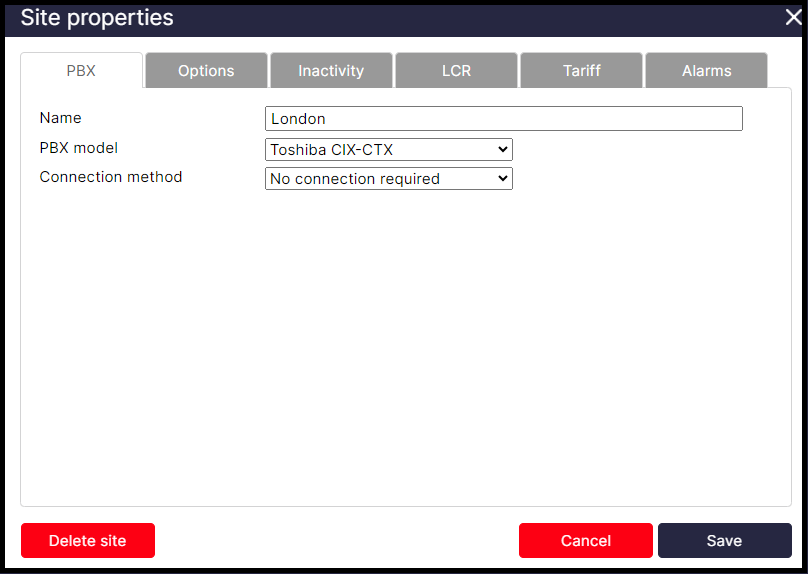
- In the Site Properties window, select Toshiba CIX-CTX from the PBX model drop-down list.
- In the Connection method field, select No connection required from the drop-down list.
- Click on the
Savebutton to apply the settings.